

Reading time: 8 min | Topics: automated SMS testing, OTP and 2FA testing, SMS API, CI pipelines, QA automation
TL;DR: Automated SMS testing means your test suite reads text messages from a real phone number through an API, rather than from a handset on someone’s desk. First, your app sends the OTP to a dedicated test number. Next, the test polls an inbox for that number. Finally, it pulls the code from the message and types it into the app. As a result, SMS login flows run in CI like any other test.
Email testing is a solved problem for most QA teams. SMS is not. Plenty of teams automate every step of a 2FA login and then stop at the text message. At that point, someone picks up a phone, reads six digits, and types them in by hand. That one manual step is why the test never runs in CI.
This guide shows how to remove it. The pattern is almost the same as the one in our automated email testing guide. However, SMS has one twist that email does not, and it is the reason most SMS tests turn flaky. We cover that twist in detail below.
What Is Automated SMS Testing?
Automated SMS testing is the practice of checking text-message flows inside a test suite, with no human in the loop. The app sends a real SMS to a real number. The test then reads that message through an API and asserts on it. Common targets include OTP codes, 2FA prompts, phone verification, and alert texts.
The key word is real. A mocked SMS provider tells you that your code called Twilio. It does not tell you that a carrier delivered the text, that the sender ID looks right, or that the code arrived in time. Only a real number on a real network can answer those questions.
Why Do Teams Still Test SMS Codes by Hand?
Most teams test SMS by hand because the obvious setup is a physical phone. Phones do not have APIs, so the test cannot read them. In short, the problem is access, not logic. Once the number lives behind an API, SMS becomes an ordinary integration test.
The manual approach also fails in ways that are easy to predict:
- It blocks CI. A test that needs a person to read a phone cannot run at 2 a.m. on a merge to main.
- It depends on one person. When the QA lead with the test phone is on leave, the 2FA suite simply stops.
- It hides slow delivery. A human waits patiently for a text. Meanwhile, a real user gives up after thirty seconds.
- It mixes test and personal data. Test codes land next to someone’s family group chat, which your security team will not love.
How Does Automated SMS Testing Work With a Real Number?
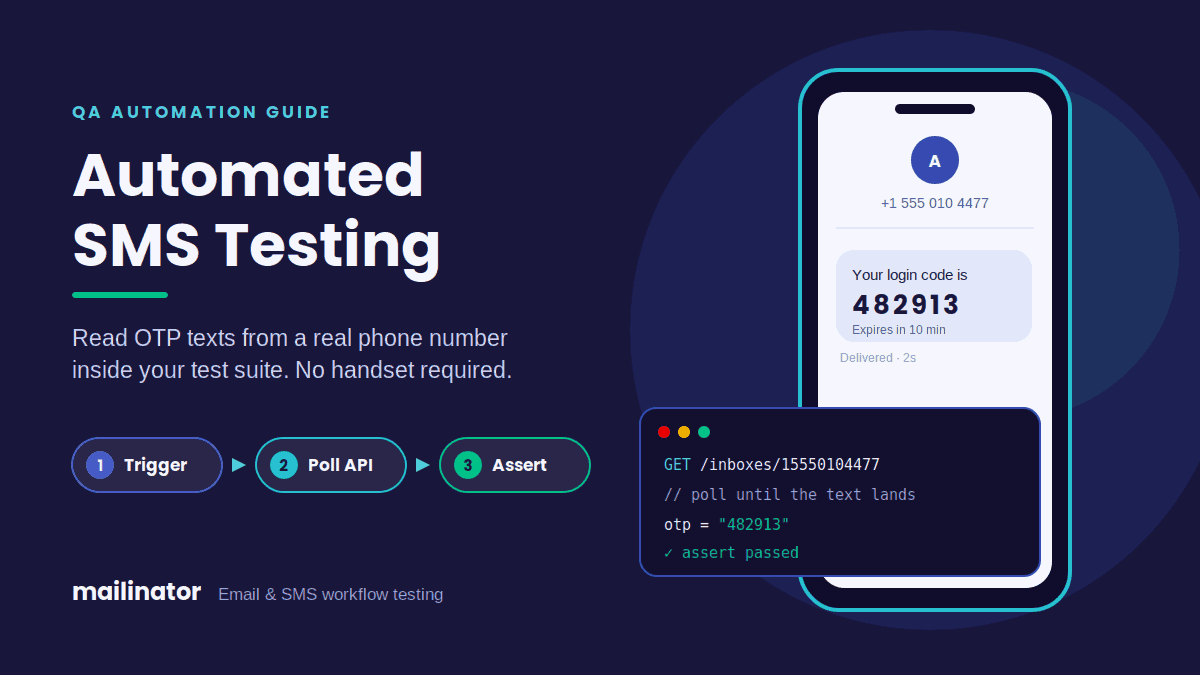
You rent a dedicated phone number and point your app’s test users at it. Every text sent to that number lands in an inbox you can query over HTTP. Your test then reads the newest message and parses the code. So the whole flow is three steps: trigger, poll, and assert.
With Mailinator, SMS testing numbers are real 10-digit numbers from telecom carriers. Each one appears in your team console as its own domain. Messages go to an inbox named after the phone number, so you read them with the same API calls you already use for email:
GET https://api.mailinator.com/api/v2/domains/{sms_domain}/inboxes/{phone_number}
Authorization: YOUR_API_TOKEN
Use only the digits of the number, with no plus sign. Then fetch the full text by ID:
GET https://api.mailinator.com/api/v2/domains/{sms_domain}/inboxes/{phone_number}/messages/{message_id}Because the calls match, one helper can serve both email and SMS tests. That also means your team has one API token to manage instead of two vendors.
How Do You Write an Automated SMS Testing Helper?
Write one function that polls the number’s inbox on a short interval, stops at a deadline, and returns the first message newer than the moment your test triggered the text. After that, a second function pulls the code out with a regular expression. Keep both small, because they will run in every 2FA test you own.
Here is the helper in Python:
import os, re, time, requests

BASE = "https://api.mailinator.com/api/v2"
HEADERS = {"Authorization": os.environ["MAILINATOR_TOKEN"]}
SMS_DOMAIN = os.environ["MAILINATOR_SMS_DOMAIN"]
NUMBER = "15550104477"  # digits only

def wait_for_sms(sent_after_ms, timeout=45, interval=2):
    deadline = time.time() + timeout
    url = f"{BASE}/domains/{SMS_DOMAIN}/inboxes/{NUMBER}"
    while time.time() < deadline:
        msgs = requests.get(url, headers=HEADERS, timeout=10).json().get("msgs", [])
        fresh = [m for m in msgs if m["time"] > sent_after_ms]
        if fresh:
            newest = max(fresh, key=lambda m: m["time"])
            return requests.get(f"{url}/messages/{newest['id']}",
                                headers=HEADERS, timeout=10).json()
        time.sleep(interval)
    raise AssertionError(f"No SMS to {NUMBER} after {timeout}s")

def extract_code(msg, digits=6):
    text = msg.get("subject", "") + " " + " ".join(
        p.get("body", "") for p in msg.get("parts", []))
    found = re.search(rf"\b(\d{{{digits}}})\b", text)
    if not found:
        raise AssertionError("No OTP found in SMS")
    return found.group(1)
And here it is inside a test:
def test_login_with_sms_otp(app):
    sent_at = int(time.time() * 1000)
    app.login(user="qa-sms-user", password=os.environ["QA_PASSWORD"])

    sms = wait_for_sms(sent_after_ms=sent_at)
    app.enter_otp(extract_code(sms))

    assert app.is_logged_in()
The same logic ports cleanly to JavaScript for Playwright or Cypress. Only the syntax changes.
How Do You Stop Parallel SMS Tests From Colliding?
This is the twist. With email, every test gets its own inbox, so collisions are impossible. With SMS, the phone number is the inbox. Therefore, two tests that share a number will read each other’s codes. To prevent that, you need a clear rule for who owns the number at any given moment.
Four rules keep automated SMS testing stable:
- Filter by time. Record a timestamp just before you trigger the text. Then ignore every message older than it. The helper above already does this.
- Serialize SMS tests. Put SMS tests in their own group and run that group with one worker. Everything else can still run in parallel.
- Delete after reading. Remove each message once the test has used it. As a result, the next run starts with a clean inbox.
- Add numbers when you scale. If one worker is too slow, give each worker its own number. A pool of three numbers supports three parallel SMS jobs.
Rules one and two cover most teams. In contrast, rule four is for suites that send hundreds of texts per run.
What Should an SMS Test Actually Assert?
Assert on the things that break in production without anyone noticing. A test that only proves “a text arrived” misses most real bugs. Instead, check the shape of the code, the sender, the wording, and how long delivery took.
- Code shape. Check the length and the character set, not just that some digits exist.
- Sender. Confirm the text came from your production sender, not a test short code.
- Template. Match the brand name and expiry line, so a template change fails loudly.
- Delivery time. Compare the message time to your trigger time. For example, fail the test if delivery takes longer than fifteen seconds.
- Expiry. Wait past the stated expiry, submit the old code, and assert that the app rejects it.
The last check catches a common security bug. Many apps say a code expires in ten minutes, yet they accept it for hours.
Can You Run Automated SMS Testing in CI?
Yes. Store the API token and the SMS domain as CI secrets, and expose them as environment variables. There is no phone to charge and no person to page. So the SMS suite runs on every merge, just like your email tests.
Two settings are worth adding once. First, give the CI job its own team token, so rotating it never breaks a local run. Second, log the message ID when a test fails. Then anyone can open that exact text in the console and see what the test saw. For a full pipeline example, see our guide to testing transactional messages in CI/CD.
Is SMS Still Worth Testing if NIST Discourages It?
Yes, because your users still rely on it. NIST’s SP 800-63B guidelines label SMS codes a “restricted” authenticator. Even so, SMS remains the most common second factor for consumer apps. If your app offers it, it needs a test.
In fact, the NIST guidance is a reason to test more, not less. Restricted status means you should offer stronger options too. For example, you can test app-based codes with the Mailinator Authenticator, and email codes with our OTP email testing guide. That way, every login path your users can pick gets the same coverage.
How Much Does an SMS Testing Number Cost?
A Mailinator SMS number costs $500 per year or $50 per month. Each number includes 500 messages a month, and you can add more numbers as your suite grows. Carrier coverage differs by country, so it pays to test a number against your own SMS provider before you commit.
Ready to take the phone off the QA lead’s desk? Set up an SMS testing number and run your first automated 2FA test today.
Frequently Asked Questions
What is automated SMS testing?
Automated SMS testing checks text-message flows, such as OTP codes and phone verification, inside a test suite with no human involved. The app sends a real text to a real test number, and the test reads it through an API to assert on the contents.
Can I test SMS OTP codes without a physical phone?
Yes. A virtual testing number from a service like Mailinator receives real carrier texts and exposes them through an API. Your test fetches the newest message, extracts the code with a regular expression, and submits it to the app.
Why are my SMS tests flaky?
Usually because several tests share one number and read each other’s messages. Filter messages by a timestamp taken just before the trigger, run SMS tests on a single worker, and delete each message after use.
Should I mock SMS in tests instead?
Mock SMS in unit tests, where speed matters most. Use a real number in end-to-end tests, because only real delivery proves the carrier route, the sender ID, and the timing work for actual users.