

Transactional email testing in a CI/CD pipeline is easy to overlook. Registration confirmations, OTP codes, password resets, and onboarding sequences all get manually spot-checked in staging — and then quietly skip automated testing entirely. That gap is more expensive than it looks.
This guide shows you exactly how to wire transactional email testing into your automated test suite using Mailinator’s API, so your CI/CD pipeline catches email regressions the same way it catches broken UI flows or failed API calls. The retrieval logic underneath is the same in any language — see automated email testing for the framework-agnostic pattern.
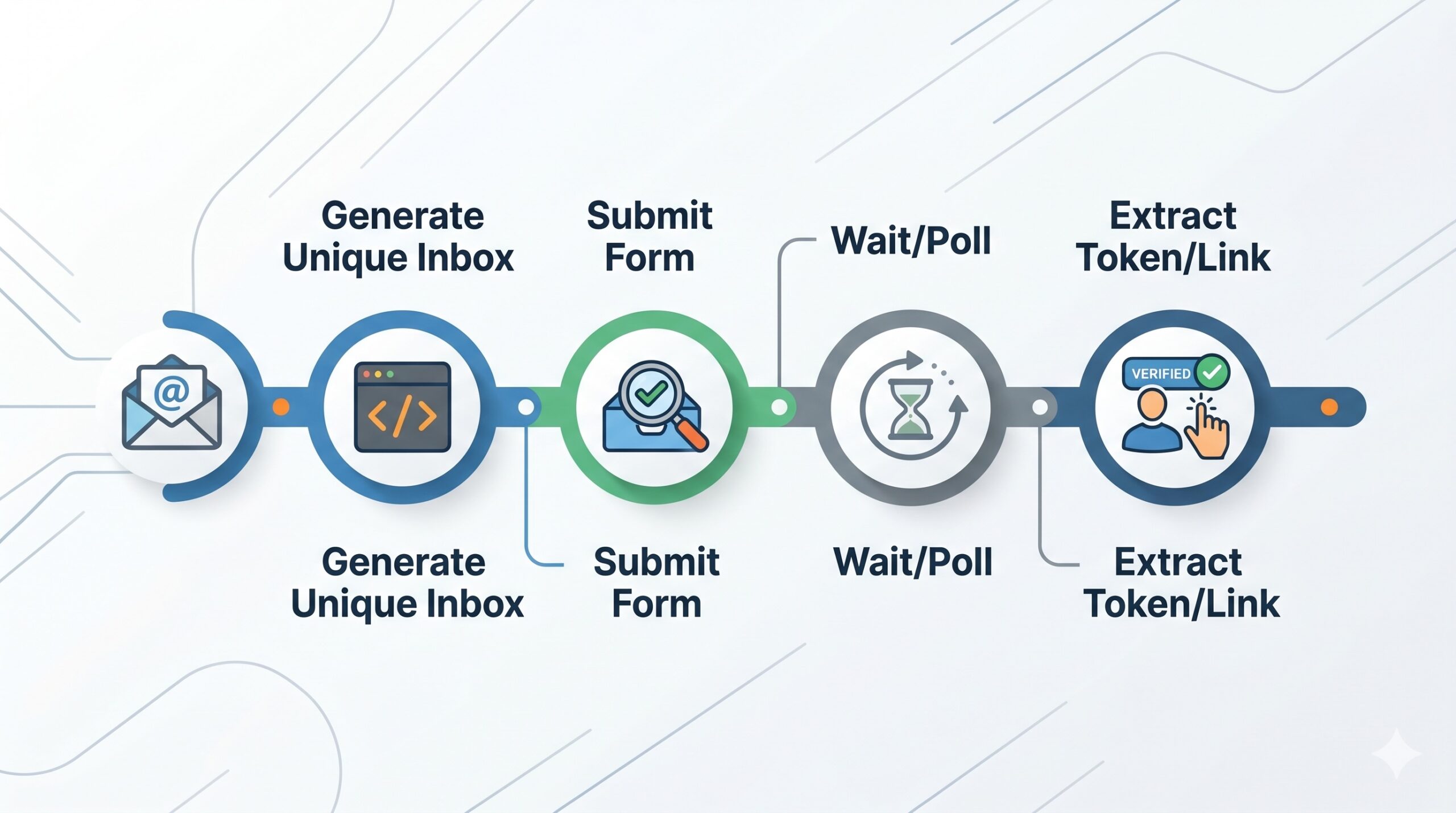
Why Does Transactional Email Testing Get Skipped in CI/CD Pipelines?
The honest answer: it’s harder than testing a REST endpoint. Email testing requires a live inbox to receive against, a way to poll for delivery, and a mechanism to inspect content — and most teams either don’t have a clean solution in their test environment or rely on a shared inbox that creates test-isolation nightmares.
The result is a common pattern: emails get tested manually in staging before release, which means:
- Email bugs ship to production before anyone catches them
- Regression coverage degrades every sprint
- A broken email template or missing OTP can block entire user flows undetected
CI/CD pipelines solve this — but only if your test environment gives you a reliable, programmable inbox to test against.
What Tools Do QA Engineers Use to Test Email in CI/CD?
Several tools exist for transactional email testing in automated CI/CD environments. Here’s how the main options compare:
| Tool | REST API | Private Domains | Team Access | Best For |
|---|---|---|---|---|
| Mailinator | Yes | Yes (paid plans) | Yes | Scalable pipeline testing |
| Mailtrap | Yes | No | Yes | SMTP sandbox testing |
| Ethereal.email | No | No | No | Local dev only |
| Guerrilla Mail | Limited | No | No | Manual ad-hoc testing |
| Self-hosted SMTP | Custom | Yes | Yes | Full control, high ops burden |
Mailinator’s advantage in a CI/CD context: its REST API makes it trivial to poll for specific emails, read content, and extract values (like OTP codes or activation links) — all without browser automation or IMAP clients.
How Do You Set Up Mailinator for CI/CD Email Testing?
Before writing a single test, get your environment right. Here’s the setup checklist.
Step 1: Use a Private Domain (Not a Public Inbox)
@mailinator.com) are visible to the entire internet. Never use them in CI/CD pipelines — test emails containing tokens, OTPs, or account data can be intercepted. Use a private domain instead.With a Mailinator Pro or Business plan, you get one or more private domains (e.g. @yourcompany.testinator.com). Only your team’s API key can read those inboxes. This is the only safe approach for automated pipelines.
Step 2: Store Your API Key as a Secret
Never hardcode your Mailinator API key in test files. Store it as an environment variable or in your CI/CD secret manager:
# GitHub Actions example
env:
  MAILINATOR_API_KEY: ${{ secrets.MAILINATOR_API_KEY }}
  MAILINATOR_DOMAIN: yourcompany.testinator.com
Step 3: Use Unique Inbox Names Per Test Run
To avoid test-isolation issues, generate a unique email address for each test run:
// JavaScript
const runId = Date.now();
const testEmail = `qa-signup-${runId}@yourcompany.testinator.com`;

# Python
import time
test_email = f"qa-signup-{int(time.time())}@yourcompany.testinator.com"
How Do You Use the Mailinator API to Verify Email Delivery?
The Mailinator REST API has two endpoints you’ll use constantly in pipeline tests:
GET /api/v2/domains/{domain}/inboxes/{inbox}— list messages in an inboxGET /api/v2/domains/{domain}/inboxes/{inbox}/messages/{message_id}— fetch the full content of a message
Here’s a complete polling helper in JavaScript that waits for an email to arrive, with retry logic:
const axios = require('axios');

async function waitForEmail(inbox, domain, apiKey, maxWaitMs = 30000) {
  const pollIntervalMs = 2000;
  const start = Date.now();

  while (Date.now() - start < maxWaitMs) {
    const response = await axios.get(
      `https://api.mailinator.com/api/v2/domains/${domain}/inboxes/${inbox}`,
      { headers: { Authorization: apiKey } }
    );
    const messages = response.data.msgs;
    if (messages && messages.length > 0) return messages[0];
    await new Promise(resolve => setTimeout(resolve, pollIntervalMs));
  }
  throw new Error(`No email arrived in ${inbox} within ${maxWaitMs}ms`);
}

const runId = Date.now();
const inbox  = `qa-signup-${runId}`;
await triggerSignup(`${inbox}@${process.env.MAILINATOR_DOMAIN}`);
const message = await waitForEmail(inbox, process.env.MAILINATOR_DOMAIN, process.env.MAILINATOR_API_KEY);
console.log('Email received:', message.subject);
How Do You Assert Email Content in Automated Tests?
Once you have the message object — a core step in transactional email testing — fetch its full body and assert on content. Here’s what you should be testing (following Jest assertion patterns):
| Assertion Type | What to Check | Example |
|---|---|---|
| Delivery | Email arrived within SLA | Assert message exists within 30s |
| Subject line | Correct template used | Assert subject === “Confirm your email” |
| Sender | From address is correct | Assert from === “noreply@yourapp.com” |
| OTP / token | Code is present and well-formed | Assert /\d{6}/ matches body |
| Links | CTA links to correct URL | Assert href contains /activate?token= |
| Personalization | User’s name is rendered | Assert body contains user’s first name |
Example: extracting and asserting a 6-digit OTP from a message body:
const detail = await axios.get(
  `https://api.mailinator.com/api/v2/domains/${process.env.MAILINATOR_DOMAIN}/inboxes/${inbox}/messages/${message.id}`,
  { headers: { Authorization: apiKey } }
);
const body = detail.data.data.parts[0].body;
const otpMatch = body.match(/\b(\d{6})\b/);
if (!otpMatch) throw new Error('OTP not found in email body');
const otp = otpMatch[1];
await submitOtpForm(otp);
How Do You Test OTP and Magic Link Emails in a Pipeline?
OTP and magic link flows are the highest-value transactional email testing scenarios in a CI/CD pipeline because they directly gate user authentication. A broken OTP email or expired link that fails silently will block every new signup.
Testing OTP Flows
- Trigger the OTP send via your app’s login or signup API
- Poll the Mailinator inbox until the email arrives
- Extract the numeric code with a regex
- Submit the OTP via your app’s verification endpoint
- Assert the subsequent session or redirect is valid
Testing Magic Link Flows
- Trigger the magic link send
- Poll the inbox and fetch the full message body
- Extract the link URL from the HTML body
- Issue an HTTP GET to that URL in your test
- Assert the response contains the expected session token or redirect
const linkMatch = body.match(
  /href=["'](https:\/\/yourapp\.com\/activate\?token=[^"']+)["']/
);
if (!linkMatch) throw new Error('Activation link not found');
const activation = await axios.get(linkMatch[1]);
expect(activation.status).toBe(200);
Pro tip: Always test that magic links expire correctly too. Issue the same link twice and assert the second request returns a 401 or redirect to an error page.
Why Should CI/CD Pipelines Use Private Domains Instead of Public Inboxes?
Public Mailinator inboxes have no access control — anyone with the inbox name can read them. In a CI/CD context, that creates three serious problems:
- Security: Test emails often contain real tokens, OTPs, or reset links that could be intercepted
- Reliability: Another process could deposit mail into the same inbox, poisoning your test results
- Test isolation: Without private domains, you can’t guarantee the message your test retrieved belongs to your test run
How Do You Integrate Mailinator Checks into GitHub Actions?
name: Integration Tests

on: [push, pull_request]

jobs:
  test:
    runs-on: ubuntu-latest
    steps:
      - uses: actions/checkout@v4
      - name: Set up Node.js
        uses: actions/setup-node@v4
        with:
          node-version: '20'
      - name: Install dependencies
        run: npm ci
      - name: Start test server
        run: npm run start:test &
        env:
          NODE_ENV: test
      - name: Wait for server
        run: npx wait-on http://localhost:3000
      - name: Run email integration tests
        run: npm run test:email
        env:
          MAILINATOR_API_KEY: ${{ secrets.MAILINATOR_API_KEY }}
          MAILINATOR_DOMAIN: ${{ secrets.MAILINATOR_DOMAIN }}
          APP_BASE_URL: http://localhost:3000
Transactional email testing in a CI/CD pipeline requires secure credential management. Key points: store credentials as repository secrets, use wait-on to ensure server readiness, and isolate email tests in their own script for flexible CI gating.
What Are Common Transactional Email Testing Mistakes to Avoid in CI/CD?
| Mistake | Why It Hurts | Fix |
|---|---|---|
Using public @mailinator.com inboxes |
Security risk; no test isolation | Use a private domain |
| Fixed inbox names across runs | Messages bleed between test runs | Append timestamp or run ID to inbox name |
| No retry / polling logic | Flaky tests due to delivery latency | Poll with timeout (30s is usually sufficient) |
| Asserting only on delivery, not content | Broken templates ship silently | Assert subject, body, links, and tokens |
| Hardcoding API key in test files | Credential exposure in version control | Use CI/CD secret manager |
| Testing against production mail server | Real users receive test emails | Point test env at a test SMTP endpoint |
Quick Reference: Mailinator API Endpoints for CI/CD Testing
| Endpoint | Purpose |
|---|---|
GET /api/v2/domains/{domain}/inboxes/{inbox} |
List messages in a private inbox |
GET /api/v2/domains/{domain}/inboxes/{inbox}/messages/{id} |
Fetch full message content |
DELETE /api/v2/domains/{domain}/inboxes/{inbox}/messages/{id} |
Delete a message after a test |
GET /api/v2/domains/{domain}/inboxes/{inbox}/messages/{id}/links |
Extract all links from an inbox |
Start Testing Email in Your Pipeline Today
Transactional email testing in CI/CD doesn’t require a custom mail server or complex IMAP integration. With Mailinator’s REST API and a private domain, you can add email assertions to your existing test suite in an afternoon.