


Email is embedded in nearly every modern application — registration confirmations, one-time passwords, password resets, subscription notifications. For QA engineers, this creates a persistent challenge: how do you reliably test email-dependent workflows without using real user addresses, cluttering production inboxes, or leaking sensitive test data? Effective email testing for QA engineers requires a dedicated strategy—one that doesn’t rely on real inboxes or unpredictable external mail services.
This guide covers the full spectrum of email testing for QA: why it matters, how to approach it at different levels of automation maturity, and what separates a professional email testing setup from one that will eventually cause production incidents.
What Is Email Testing for QA Engineers?
Email testing in QA refers to verifying that an application correctly sends, formats, and delivers email messages as part of its functional behavior. This goes well beyond checking whether a message arrives — it includes:
- Confirming that trigger conditions (signup, purchase, password reset) produce the correct email
- Validating email content, subject lines, and dynamic data insertion
- Verifying links, tokens, and OTP codes embedded in messages
- Testing across email clients for rendering consistency
- Ensuring delivery timing meets user expectations
- Catching regressions in email templates after code changes
Email flows often sit at the critical path of user journeys. A broken verification email means a user cannot complete registration. A malformed OTP means they cannot log in. For QA engineers, email is not a secondary concern — it is a first-class test target.
Why Email Testing Is Harder Than It Looks
Unlike most application components, email is inherently asynchronous. A test that sends a registration request cannot immediately query a database row to confirm success — it must wait for an email to be delivered, then inspect its contents. This introduces several complications:
Asynchronous delivery
Email does not arrive instantaneously. Delivery depends on SMTP relay latency, spam filtering, and network conditions. A test suite that does not account for this will produce flaky results — sometimes passing, sometimes timing out.
Test data contamination
Using real email addresses in tests means test emails land in real inboxes. This creates noise, privacy risks, and the possibility of test links being accidentally clicked by real users.
Shared public inboxes
Many teams default to well-known disposable email services with public inboxes. While convenient for manual testing, public inboxes expose your test emails — and any tokens, OTPs, or URLs they contain — to anyone on the internet. This is a meaningful security risk in any environment that resembles production.
Lack of API access
To automate email verification, your tests need to programmatically fetch, parse, and act on email content. Most disposable email services were designed for manual use and do not offer a reliable API suitable for automated test pipelines.
The teams that handle email testing well treat the inbox as a first-class test dependency — something that needs the same isolation, reliability, and API access as any other service their tests depend on.
Public Inboxes vs. Private Test Domains: What QA Teams Should Know
The most consequential decision in your email testing setup is whether to use public shared inboxes or a private test domain. The table below summarizes the tradeoffs:
| Factor | Public Inboxes (e.g. @mailinator.com) | Private Test Domain (Mailinator) |
|---|---|---|
| Visibility | Anyone on the internet can read it | Only your team |
| Test data isolation | None — shared with the world | Full isolation per project |
| Suitable for CI/CD | Risky — data leaks to competitors | Yes — secure, API-accessible |
| API access | No | Yes — full REST API |
| Custom routing rules | No | Yes — route by pattern or regex |
| Attachments | No | Yes |
| Webhook support | No | Yes |
| Recommended for production testing | No | Yes |
For exploratory testing or early-stage prototyping, a public inbox may be acceptable. For any test suite that runs against staging or production-like environments — especially those that generate OTPs, authentication links, or user-specific tokens — a private domain is the professional standard.
Mailinator’s private domain feature allows teams to create one or more domains exclusively for their organization. Emails sent to any address at that domain are visible only to authenticated members of your team, and are fully accessible via the Mailinator REST API.
How to Test Email Verification Flows
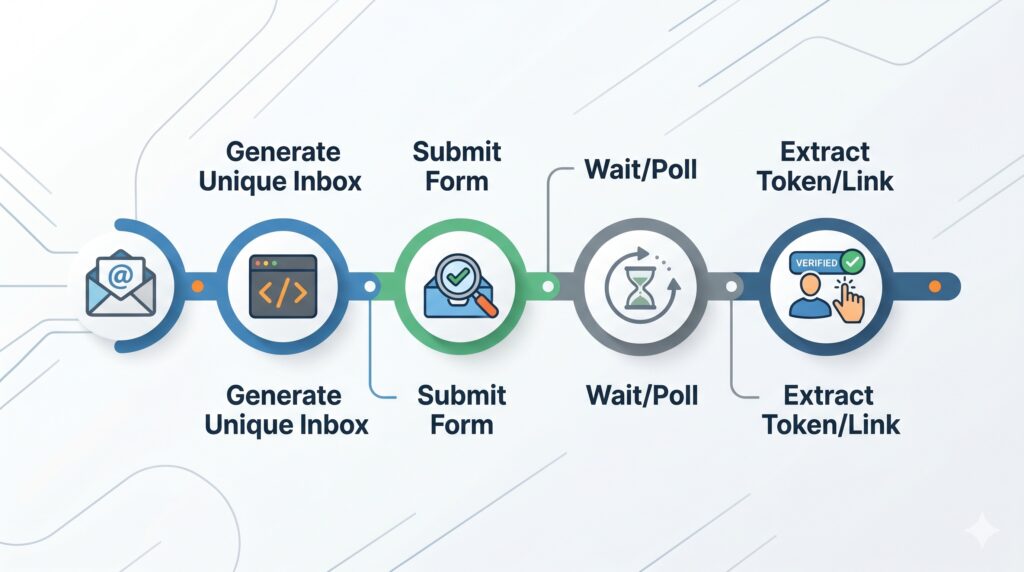
Email verification — where a user receives a link or code to confirm their address — is one of the most common email test scenarios. Here is a reliable approach for automating it:
Step 1: Generate a unique test address per test run
Rather than reusing a fixed address, generate a dynamic address for each test. This ensures inbox isolation and eliminates interference between parallel test runs.
const testEmail = `test-${Date.now()}-${uuid()}@your-private-domain.com`;Step 2: Trigger the verification flow
Submit the generated address through your application’s signup or verification form, either via the UI or directly against the API.
Step 3: Poll the Mailinator API for the message
Use the Mailinator API to fetch messages for the generated inbox. Poll with a timeout and backoff interval to handle delivery latency.
// Fetch messages from Mailinator API
GET https://mailinator.com/api/v2/domains/{domain}/inboxes/{inbox}
Step 4: Extract and use the verification token
Parse the email body to extract the OTP code or verification link. Use regex or structured parsing depending on your email format.
Step 5: Assert and continue the test flow
Submit the extracted token back to your application and assert that the verification succeeds. Clean up the test data as appropriate.
Pro tip: If your application sends verification emails from a consistent template, define a reusable parsing function in your test utilities. This keeps individual test cases clean and makes template changes easy to accommodate in one place.
How to Test OTP (One-Time Password) Emails
OTP email testing follows the same general pattern as verification testing, but with tighter timing constraints. OTPs are time-sensitive — most expire within five to fifteen minutes — so your test suite must fetch and use them promptly.
Key considerations for OTP testing:
- Use a fresh inbox per test to prevent OTP collision across parallel runs
- Set your polling timeout below the OTP expiry window (e.g., poll for up to 60 seconds for a 5-minute OTP)
- Test the expiry behavior explicitly — submit an expired OTP and assert the correct error response
- Test OTP reuse — most implementations should reject a code once it has been consumed
- Verify that multiple OTP requests invalidate previous codes
Mailinator’s API makes OTP extraction straightforward because you can fetch the full email body, including HTML and plain-text parts, via a single authenticated API call. No scraping required.
Integrating Email Testing into CI/CD Pipelines
Email test automation reaches its full value when it runs automatically on every commit or pull request. Here is how to integrate Mailinator-based email tests into a standard CI/CD pipeline:
Store credentials securely
Your Mailinator API key and private domain name should be stored as CI environment variables, never hardcoded in test files. Most CI platforms (GitHub Actions, GitLab CI, Jenkins, CircleCI) support encrypted secrets for this purpose.
Use a consistent domain naming convention
Define a pattern for test addresses that identifies the CI run. For example: ci-{JOB_ID}-{TEST_NAME}@your-domain.com. This makes it easy to trace which test generated which email during debugging.
Set generous but bounded timeouts
In CI environments, email delivery may be slower than in local development. A polling timeout of 90 to 120 seconds is typically sufficient while still catching genuine delivery failures.
Clean up test inboxes
Mailinator provides API endpoints to delete messages. Call these in your test teardown to keep your private domain tidy, especially in long-running test suites.
Run email tests in parallel safely
Because each test run generates a unique inbox address, email tests are safe to parallelize without inbox collision. This is a significant advantage over testing against shared or static inboxes.
Using the Mailinator API for Automated Email Testing
The Mailinator REST API is the core tool for automating email verification in test suites. The most commonly used endpoints are:
Fetch inbox messages
GET /api/v2/domains/{domain}/inboxes/{inbox}Returns a list of messages in the specified inbox. Use this to confirm arrival and retrieve message IDs.
Fetch message content
GET /api/v2/domains/{domain}/inboxes/{inbox}/messages/{messageId}Returns the full message content including subject, sender, headers, and body parts. Use this to extract OTPs, links, or any structured data from your email.
Delete a message
DELETE /api/v2/domains/{domain}/inboxes/{inbox}/messages/{messageId}Deletes a specific message. Call this in test teardown to clean up after each test run.
Webhook support
For event-driven test architectures, Mailinator supports webhooks that push incoming messages to a specified URL. This eliminates polling entirely and can reduce test execution time significantly for workflows that depend on near-instant delivery confirmation.
Email Testing Best Practices for QA Engineers
- Treat email as a first-class test dependency. Give email testing the same structure, coverage, and automation investment you give your API or UI tests.
- Never use real addresses in automated tests. Use a dedicated test domain. Real addresses create privacy risks and unpredictable side effects.
- Generate unique inboxes per test. Avoid shared static addresses that cause test interference in parallel runs.
- Use private domains in any environment resembling production. Public inboxes expose tokens, OTPs, and user flows to the open internet.
- Test failure modes, not just the happy path. Assert what happens when an email does not arrive, when a token is expired, or when a link is clicked twice.
- Include email tests in your CI gate. A broken welcome email or OTP flow discovered in CI is far cheaper than one discovered by a user.
- Document your email testing patterns. As your application’s email surface grows, a shared library of helpers for inbox polling, token extraction, and cleanup will save significant time across the team.
Getting Started with Mailinator for Professional Email Testing
Teams that need private domains, API access, webhooks, and full inbox control can get started with a free trial of the Mailinator Verified Pro or Business plan. Private domains are not available on the free tier — they are a feature of plans designed specifically for teams running automated test suites.
A private domain gives your QA team complete isolation, a full REST API, and the confidence that your test tokens are never visible outside your organization. For teams that take email testing seriously, it is the right default — not an optional upgrade.