

Reading time: 9 min | Topics: end-to-end email testing, QA automation, Playwright, verification links, private testing domains | Last updated: November 5, 2026
TL;DR: End-to-end email testing checks the whole loop a real user goes through: the app sends a message, the message arrives, and the link or code inside it actually works. Fortunately, the pattern is always the same. First, give each test a unique address on a private domain, trigger the flow in the browser, poll an inbox API until the email lands, extract the link or code, then finish the flow and assert the result. Mocks cannot catch the bugs that live between your app and the inbox. However, an end-to-end test can.
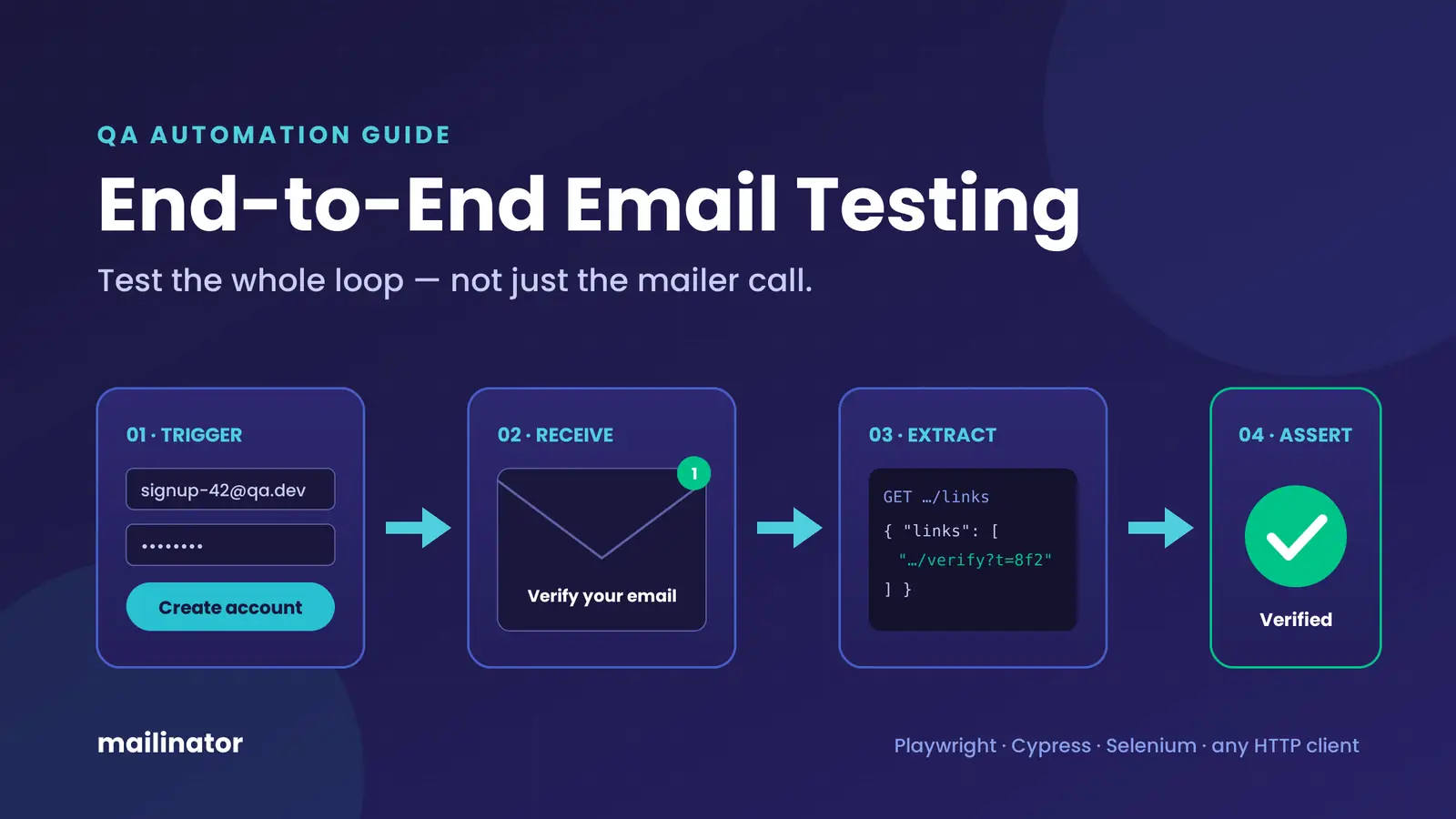
Most teams have unit tests for the code that builds an email. Some even assert that a mailer function was called. Still, signup breaks in production anyway, because the queue worker was down, the template rendered a raw token, or the verification link pointed at staging. None of those failures happen inside the function you mocked. Instead, they happen in the gap between “the app sent it” and “the user clicked it.” End-to-end email testing covers exactly that gap.
What Is End-to-End Email Testing?
End-to-end email testing is an automated test that follows an email-dependent flow from start to finish. The test triggers an action in the UI, waits for the real email to arrive at a real inbox, reads the message through an API, and then uses its link or code to complete the flow. As a result, it proves the feature works for a user, not just that a function returned.
That makes it different from two things it is often confused with. For example, a unit test checks that your template renders the right string. Meanwhile, a deliverability test checks whether Gmail or Outlook puts your newsletter in the inbox or the spam folder. End-to-end email testing, by contrast, sits between them: it asks whether the product flow works, end to end, every time you deploy.
Why Do Mocked Email Tests Miss Real Bugs?
Mocked tests stop at the mailer call, so they never see what the user sees. Yet most email bugs live after that call: a worker that silently failed, a template variable that rendered as raw text, a link built with the wrong host, or a token that expired before anyone could click it. In the end, only a test that reads the delivered message can catch them.
Below are the failures we see most often when teams finally add a real inbox to their suite:
- The email never sends. A background job queue is paused, a feature flag is off in one environment, or an SMTP credential rotated without anyone updating the config.
- The link points to the wrong place. The base URL comes from an environment variable, and staging happily emails users a link to production, or to
localhost:3000. - The token is broken. It was URL-encoded twice, truncated by a line wrap, or invalidated by a second email the app sent a moment later.
- The content is wrong. Users get
Hi {{ first_name }}, the wrong currency, or another tenant’s logo.
Each of these still passes a mocked test. In contrast, each one fails an end-to-end test within seconds.
What Should an End-to-End Email Test Assert?
A good end-to-end email test asserts on six layers: the message arrived in time, the headers are right, the content rendered, the links point to the right host, the action inside the email works, and no email was sent when none should be. Of course, you rarely need all six in one test. Even so, your suite should cover each layer somewhere.
| Layer | What to assert | Bug it catches |
|---|---|---|
| Delivery | Message reaches the expected address within your timeout | Dead queue worker, wrong trigger, missing config |
| Headers | From, Reply-To and Subject match the environment | Wrong sender, “[STAGING]” leaking to users |
| Content | Name, amounts and locale rendered; no raw template tags | Broken variables, wrong tenant branding |
| Links | Every link uses the expected host and HTTPS | Staging links to production, localhost URLs |
| Action | Clicking the link or entering the code changes app state | Expired, double-encoded or single-use tokens |
| Negative | No email for unknown accounts; no duplicates | Account enumeration, double sends |
Which Email Flows Need End-to-End Coverage?
First, prioritize the flows that block a user when they break: signup verification, one-time passcodes, password resets, magic links and team invites. Receipts and notifications come next. In short, if an email gates access to your product, it deserves an end-to-end test that runs on every deploy.
| Flow | What the test extracts | Final assertion | Deep dive |
|---|---|---|---|
| Signup verification | Verification link | Account shows as verified | Playwright guide |
| OTP / 2FA | 6-digit code | User reaches the dashboard | OTP and 2FA testing |
| Password reset | Reset link | Old password fails, new one works | Cypress guide |
| Magic link login | Sign-in link | Session is authenticated | SSO and magic links |
| Team invite | Invite link | Invitee joins the right workspace | — |
| Receipt | Order total, line items | Values match the order | — |
How Do You Structure an End-to-End Email Test?
Every end-to-end email test follows five steps: create a unique address, trigger the flow in the browser, poll the inbox API until the message arrives, extract the link or code, and finish the flow with an assertion on app state. In other words, the framework only changes the syntax. The shape stays the same in Playwright, Cypress, Selenium or a plain HTTP client.
- Generate a unique address. Use something like
signup-1730851200-3@your-domain.com. On a private testing domain, every inbox already exists, so there is nothing to create first. - Trigger the flow. Fill the signup form, request a reset, or ask for a code, exactly as a user would.
- Poll until it arrives. Call the inbox endpoint in a loop with a deadline. In other words, never use a fixed sleep.
- Extract what you need. For URLs, use the links endpoint. For codes, a regex on the body is enough.
- Finish and assert. Next, visit the link or type the code. Then check the state the user should now be in.
Here is a complete signup verification test in Playwright. It uses the built-in request fixture for the API calls, so you need no extra dependencies.
import { test, expect, APIRequestContext } from '@playwright/test';

const BASE = 'https://api.mailinator.com/api/v2';
const DOMAIN = process.env.MAILINATOR_DOMAIN!;  // your private testing domain
const TOKEN = process.env.MAILINATOR_TOKEN!;     // API token, stored as a CI secret
const auth = { headers: { Authorization: TOKEN } };

async function waitForEmail(api: APIRequestContext, inbox: string,
                            subject: string, timeoutMs = 30_000) {
  const deadline = Date.now() + timeoutMs;
  while (Date.now() < deadline) {
    const res = await api.get(`${BASE}/domains/${DOMAIN}/inboxes/${inbox}`, auth);
    const { msgs = [] } = await res.json();
    const hit = msgs.find((m: any) => m.subject.includes(subject));
    if (hit) return hit;
    await new Promise((r) => setTimeout(r, 2_000));
  }
  throw new Error(`No "${subject}" email for ${inbox} within ${timeoutMs} ms`);
}

test('signup sends a working verification link', async ({ page, request }) => {
  const inbox = `signup-${Date.now()}-${test.info().workerIndex}`;

  // 1–2. Unique address, then trigger the flow like a user
  await page.goto('/signup');
  await page.getByLabel('Email').fill(`${inbox}@${DOMAIN}`);
  await page.getByLabel('Password').fill('Test-Passw0rd!');
  await page.getByRole('button', { name: 'Create account' }).click();

  // 3. Poll until the real email arrives
  const msg = await waitForEmail(request, inbox, 'Verify your email');

  // 4. Let the API extract links instead of regex-parsing HTML
  const res = await request.get(
    `${BASE}/domains/${DOMAIN}/inboxes/${inbox}/messages/${msg.id}/links`, auth);
  const { links } = await res.json();
  const verifyUrl = links.find((l: string) => l.includes('/verify'));

  // Link layer: right host, HTTPS
  expect(verifyUrl).toMatch(/^https:\/\/staging\.example\.com\//);

  // 5. Finish the flow and assert app state
  await page.goto(verifyUrl);
  await expect(page.getByText('Your email is verified')).toBeVisible();
});
Similarly, the same three API calls work from any language. If your suite is in Python, Java, C# or Go, the automated email testing pattern guide has the equivalent helpers. Alternatively, for a browser-only approach, see Selenium with Mailinator.
How Do You Stop Flaky Email Tests?
Email tests flake for three reasons: fixed sleeps, shared inboxes, and loose message matching. To fix them, replace sleeps with polling against a deadline, give every test and every worker its own inbox, and match on subject inside that unique inbox. After those three changes, a failed email test almost always means a real bug.
- Poll, don’t sleep. A
sleep(10)is too slow on a good day and too short on a bad one. Instead, a two-second poll with a 30-second deadline is fast and tolerant. - One inbox per test. Put a timestamp and the worker index in the inbox name. As a result, parallel runs can never read each other’s mail, and you never need a cleanup step.
- Set the timeout to your SLA. If a password reset should land in 10 seconds, use that budget. After all, a slow email is a bug worth failing on.
- Write a useful failure message. Include the inbox and subject in the error, so the CI log tells you what never arrived. For timing questions, the SMTP transaction log shows when each hop happened.
- Keep test addresses off blocklists. Many signup validators reject well-known disposable domains. That is why test emails get blocked, and a private domain avoids it.
Public Inbox or Private Domain: Which Should Your Tests Use?
Use a private domain for anything automated. Public inboxes are fine for a quick manual check, but anyone can read them. Also, many apps block public disposable domains at signup. A private domain, on the other hand, gives you unlimited inboxes only your team can read, API access, and addresses your own validators will accept.
| Public Mailinator inbox | Private testing domain | |
|---|---|---|
| Who can read the mail | Anyone who guesses the inbox name | Only your team |
| Passes signup validation | Often blocked as disposable | Yes, it is your domain |
| API for automated reads | Not for automation | Yes, with an API token |
| Webhooks and routing rules | No | Yes |
| Best for | Manual spot checks | End-to-end suites and CI |
You do not need a budget to start. The free Verified Pro plan includes one private domain, unlimited private inboxes, API access, webhooks and routing rules, with an allowance of 1,000 emails a month. That covers one engineer building out a suite. Later, once the whole team runs end-to-end email tests in CI, a Business plan adds seats and higher limits.
Where Do These Tests Run in CI?
Ideally, run them in the same CI job as your other browser tests, against a staging environment that sends real mail to your private domain. Then store the API token as a secret, run the email specs in parallel with unique inboxes, and fail the build on a missed deadline. Because each test owns its inbox, no extra setup or teardown step is needed.
Keep the suite lean, though. End-to-end tests are the slowest layer of the test pyramid, so test template edge cases in unit tests instead and reserve end-to-end email tests for the flows that gate access. For a full GitHub Actions setup, see how to test transactional email in a CI/CD pipeline.
Frequently Asked Questions
What is end-to-end email testing?
It is an automated test that triggers an email in your app, reads the delivered message from a real inbox through an API, and uses the link or code inside it to finish the flow. Therefore, it verifies the feature works for a real user, not just that your code called a mailer.
How is end-to-end email testing different from deliverability testing?
Deliverability testing checks whether mailbox providers like Gmail place your mail in the inbox or in spam. End-to-end email testing, however, checks whether your product flow works: the email sends, the content is right, and the link or code completes the action. As a rule, most teams need both, for different reasons.
Do I need to run my own mail server?
You need somewhere real to receive the mail, but you do not need to run it. With a private Mailinator domain, your staging app sends to addresses on that domain, and your tests read the messages through the REST API. As a result, there is no IMAP, no mailbox to create, and no server to maintain.
How long should a test wait for an email?
Poll every one to two seconds with a deadline that matches what users expect, usually 10 to 30 seconds. Above all, avoid fixed sleeps. If the email has not arrived by the deadline, fail the test with the inbox and subject in the error message.
Is the free Mailinator plan enough to get started?
For one engineer, usually yes. The free Verified Pro plan gives you a private domain, unlimited inboxes, API access and webhooks. However, when a whole team runs the suite in CI on every commit, a paid plan adds seats and higher message limits.
Start Testing the Whole Email Flow
End-to-end email testing is the cheapest way to stop shipping broken signups and password resets. So pick the one flow that would hurt most if it broke, write a single test for it this week, and run it on every deploy. Get a free Verified Pro account and you can have a private domain and an API token in a few minutes.