

Reading time: 4 min | Topics: AI agents, agent readiness, Mailinator MCP server, Mailinator CLI, email confirmation flows
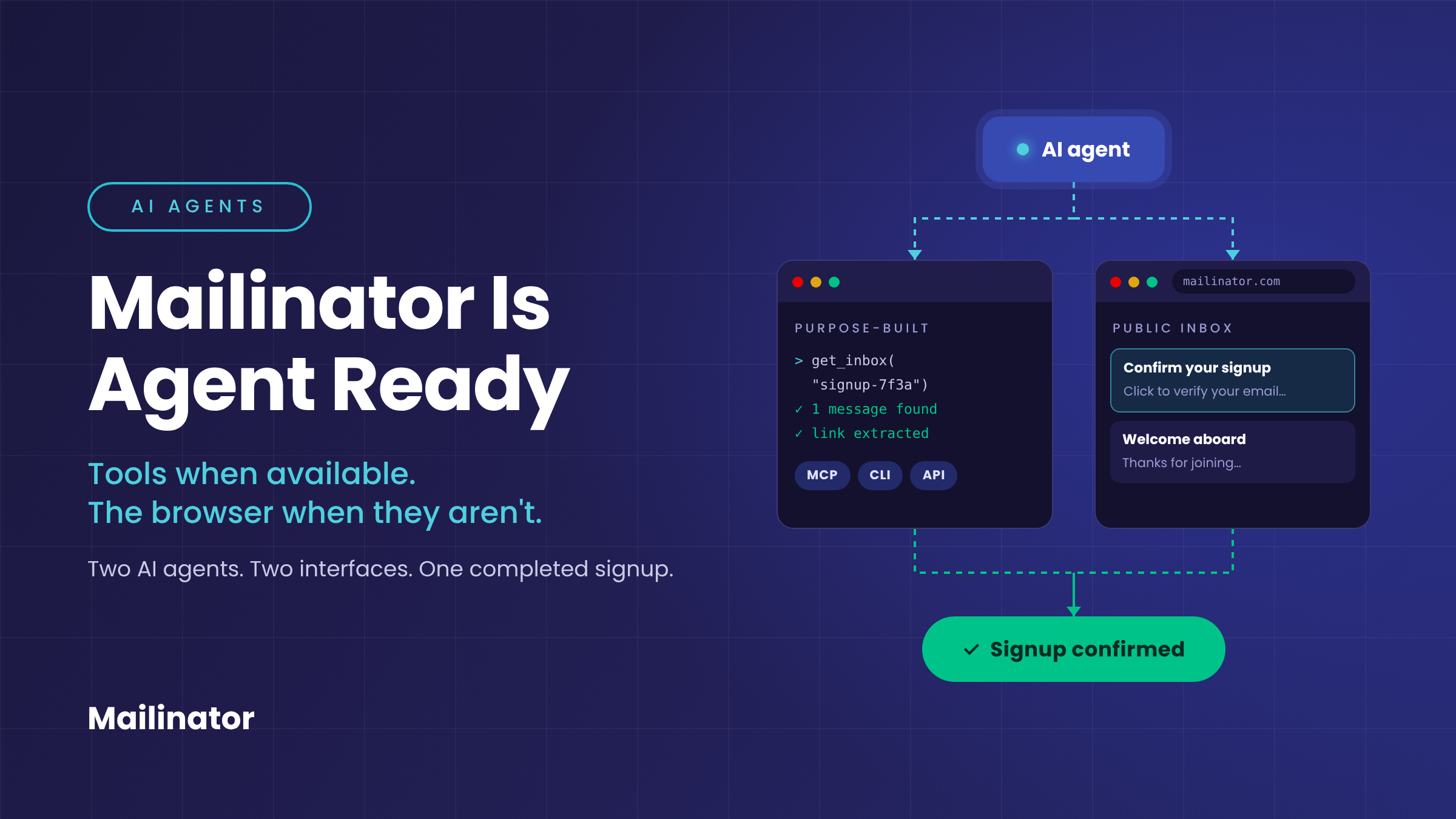
Short answer: To sign up for a website on its own, an AI agent needs a way to receive and read the confirmation email. Mailinator gives agents two ways to do that: purpose-built interfaces (an MCP server, a CLI, and APIs) for dependable, repeatable workflows, and a public inbox that any browser-capable agent can use with nothing more than an @mailinator.com address.
What Does It Take for an AI Agent to Sign Up for a Website?
In Shifting Computer Interfaces, Chris Kenst described asking Codex to sign up as a member of Kenst.com. The request was one line long. Chris didn’t explain the signup process or tell Codex how to handle the confirmation email.
Codex had Mailinator’s command-line tool installed, and it used that tool to complete the signup.
The Same Experiment, Without Any Mailinator Tools
Chris later ran the same experiment with Muse AI, Meta’s new chatbot designed to act as a personal assistant that gets things done. This time, the agent didn’t have any Mailinator-specific tools.
Muse asked Chris which email address it should use. He told it to make one up using an @mailinator.com address. That was the only question Muse asked.
From there, Muse chose an address, opened a browser, navigated to Mailinator’s public inbox, found the confirmation email, and completed the signup.
The outcome was the same. The interface was different.
What Are the Two Paths to Agent Readiness?
Mailinator already provides several direct ways for agents and automated systems to work with email:
These are the purpose-built path to agent readiness. They let an agent interact with Mailinator programmatically as part of a larger workflow. For developers building dependable agent workflows, or testers building automated tests, these remain the right tools.
The Muse experiment demonstrated a second path. Without a Mailinator-specific integration, Muse used the same public inbox that a person would use through a browser.
| Purpose-built path | Browser path | |
|---|---|---|
| Interface | MCP server, CLI, APIs | Mailinator’s public website |
| What the agent needs | The tool installed or configured | An @mailinator.com address and a browser |
| Best for | Repeatable agent workflows and automated tests | Ad-hoc tasks when no integration is installed |
| In the experiment | Codex, using the Mailinator CLI | Muse, navigating the public inbox |
This doesn’t prove that every agent can complete every Mailinator workflow through the website. It shows that one action-oriented assistant completed a public-inbox confirmation flow without being given instructions for navigating Mailinator.
Why Does Agent Readiness Need More Than One Layer?
Tools when available, the browser when they aren’t. The comparison suggests that agent readiness can exist at more than one layer.
Mailinator’s MCP server, CLI, and APIs provide structured interfaces for repeatable workflows. Its public website provides another route for agents capable of operating a browser.
That distinction matters because agents won’t always begin with the ideal integration installed. A purpose-built tool may offer the most dependable path, but its absence doesn’t necessarily stop the workflow.
In this experiment, Muse needed only an email domain and access to a browser. It handled the rest of the public-inbox confirmation flow on its own.
Frequently Asked Questions
Can an AI agent use Mailinator without an integration?
Yes, if it can operate a browser. In Chris Kenst’s experiment, Meta’s Muse used an @mailinator.com address and Mailinator’s public inbox to find a confirmation email and finish a signup, with no Mailinator-specific tools installed.
Which Mailinator tools are built for AI agents?
Mailinator offers an MCP server, a command-line tool, and APIs. These give agents structured, programmatic access to email as part of a larger workflow.
When should I use the MCP server, CLI, or API instead of the browser?
Use the purpose-built tools whenever you need dependable, repeatable results, such as agent workflows you run on a schedule or automated tests in CI. The browser path is useful when an agent doesn’t have an integration installed, but it isn’t a substitute for a structured interface in production workflows.