


Picking up from the previous post… Now that you understand what Mailinator does and how teams use it, let’s explore how it fits into the wider email testing space. The key insight is that “email testing” encompasses several distinct categories of tools, each targeting different risks and functions related to email communication.
Mailinator vs. Email Design and Preview Tools
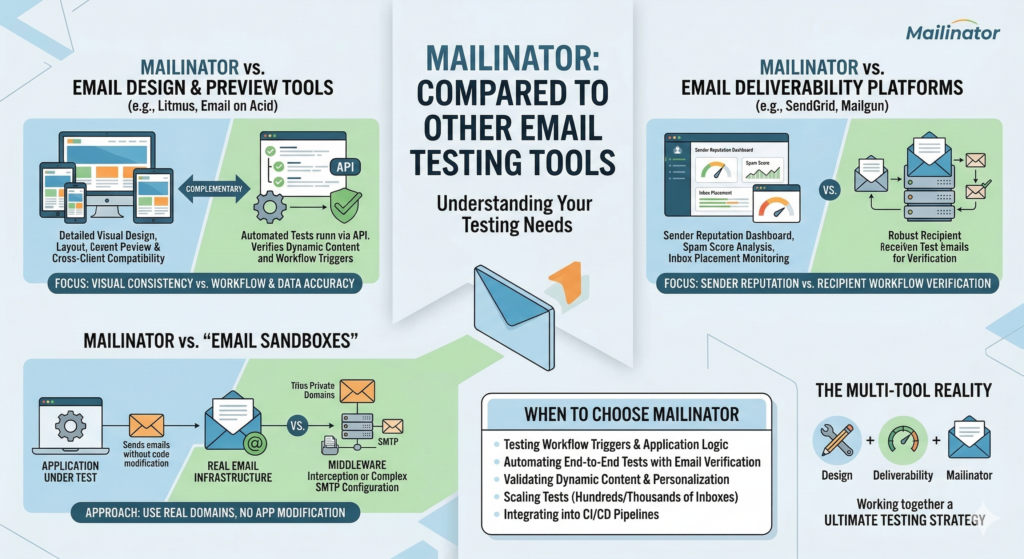
Tools like Litmus and Email on Acid are built for email design preview, they focus on risks relating to visual consistency and client compatibility. These tools will show you an email preview in email clients like Outlook, Apple Mail, Gmail and more, allowing designers, marketers and testers to see how the end user will view the email. Mailinator doesn’t compete in this space. Mailinator focuses on testing the workflow that triggers these emails, and on the dynamic data they may contain. Teams should care about email arrival, data and visual risks, therefore should combine tools to mitigate them. Using Mailinator to focus on the end-to-end testing and tools like Litmus to perfect the visual design and layout. These tools complement each other, they do not compete.
Mailinator vs. Email Deliverability Platforms
Tools like Mailtrap, Mailgun, and SendGrid specialise in deliverability testing, spam score analysis, and inbox placement monitoring. They help ensure emails arrive, and maintain a strong sender reputation. Mailinator doesn’t focus on deliverability, it focuses on the recipient side of these flows. Its purpose is to verify that your applications are sending the right emails, at the right time, with the correct content. Deliverability tools monitor how your message flows through the email ecosystem, while Mailinator focuses on receiving them to confirm your application correctly triggered an email. These tools target different risks. For testing application workflows that trigger an email, teams rely on Mailinator. Teams may combine both as part of a complete testing strategy.
Mailinator vs. ‘Email Sandboxes’
Some platforms market themselves as “email sandboxes” that intercept test emails before they reach real users. Mailinator’s private domain functionality provides the same benefits but with a fundamentally different approach. Instead of acting as middleware or requiring SMTP configuration, Mailinator provides real, fully functional email infrastructure. Your private test domain receives emails exactly as a production mail server would, exactly like the ones your customers use, e.g. gmail or outlook. This approach means you don’t need to modify the application under test, you just create accounts that have an email address on your private Mailinator domain.
Mailinator’s Unique Position: API-First Workflow Testing
What sets Mailinator apart is the fact it was purpose built for test automation, with a focus on speed and API connectivity. While many tools treat APIs as an add-on, Mailinator was designed from the ground up for programmatic integration. Every feature, such as; inbox access, message retrieval, domain management, and webhook configuration, are all available through the API. This design makes Mailinator the perfect fit for your automated testing frameworks. If the email testing challenge you are facing is to automate end-to-end tests that include email verification, Mailinator’s architecture is built precisely for that workflow.
When to Choose Mailinator
Choose Mailinator when your focus is testing application workflows at scale. If the risks you are trying to mitigate are email receipt, data accuracy or SMS then Mailinator is the right choice for you. If your goal is to analyse spam risk, preview designs across clients, or monitor deliverability in production, then alternative tools will better fit those needs. Mailinator’s strength lies in workflow testing, ensuring your application sends the right message, at the right time, with the right data.
Choose Mailinator when:
- Testing application logic and workflow triggers
- Automating end-to-end tests with email verification
- Validating dynamic content and personalisation
- Testing as scale (hundreds/thousands of parallel inboxes)
- Integrating tests into your CI/CD pipelines
Choose complementary tools when:
- Previewing design across 100+ email clients (use Litmus)
- Monitoring production deliverability (use SendGrid/Mailgun)
- Analyzing spam scores (use dedicated deliverability tools)
The Multi-Tool Reality
Professional testing and QA teams put a strong emphasis on risk mitigation, and to do that well, they need to use multiple specialized tools rather than searching for the one unicorn tool. A tool that does everything, will do several of them poorly. It’s about combining Mailinator with other tools specialized in their own space, such as design and visual consistency.