


Today we’re excited to announce a complete overhaul and redesign of the Mailinator documentation. This is more than a fresh coat of paint, it’s a full rethinking of how our customers learn, navigate, and succeed with Mailinator. Whether you’re testing
Over the years, we’ve expanded: new APIs, a Postman collection, and more. While the platform grew, the documentation did not. It became clear that we needed a better, faster way to help QA teams and other users find what they need and unlock what Mailinator can really do.
So we rebuilt the documentation from the ground up. Here’s how it looks today:
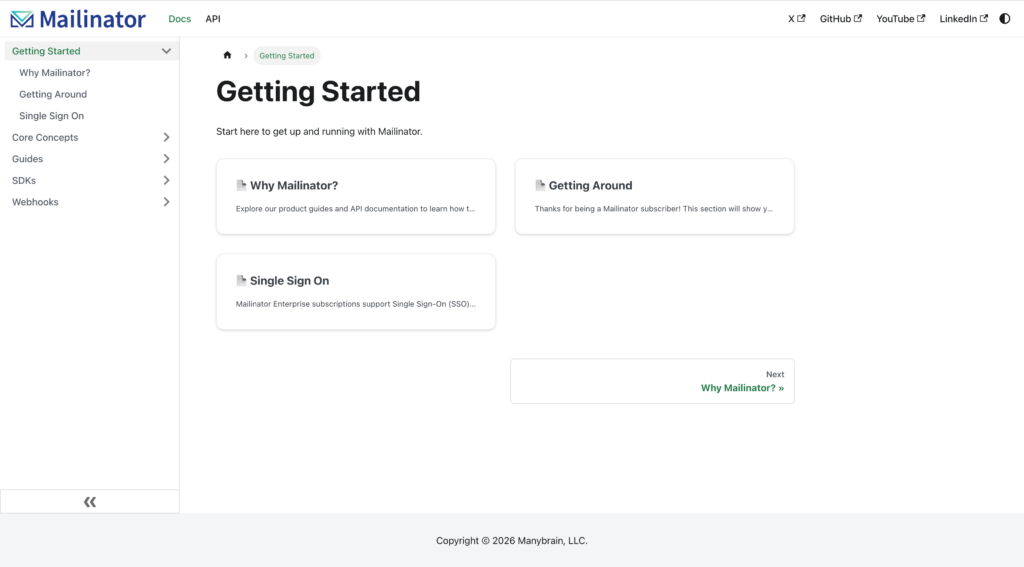
What’s New
🔍 Better Navigation & Structure
The entire documentation system has been reorganized with clarity in mind:
- A cleaner sidebar that’s easier to navigate
- Faster navigation to API and Product Documentation
- Improved topic hierarchy
Whether you’re onboarding for the first time or building advanced automation, you’ll get where you need to go faster.
🌐 Standardized URLs and API References
All API documentation now uses:
api.mailinator.com
This ensures consistency across code samples, walkthroughs, and reference pages.
🆕 Updates to Public API Endpoints and Parameters
The redesign also reflects several new and expanded public API capabilities, including:
- New streaming endpoint for real-time message visibility
- New request parameters, such as:
- Retrieving a full message instead of just its summary
- Automatically deleting a message after a specified timer
These features are now documented clearly with updated endpoint syntax and parameter definitions.
📘 Clearer Platform Coverage
The new structure better explains the major sections of the Mailinator platform, including:
- Public and private domain usage
- API references and message retrieval
- Guides on taking advantage of Mailinator’s email testing features
Our goal is simple: if Mailinator does it, the documentation now shows where and how.
⏭️ What’s Coming Next
This release is a major step, but we’re not done.
Soon we’ll be rolling out:
- Quickstart guides to help new users get productive even faster
- Automation examples to support testing common workflows like OTP and MFA testing
- Comprehensive Overview of Mailinator
We’d Love Your Feedback
We want to continue improving with your help. If something is missing, unclear, or you’d like to see new examples or explanations, let us know or edit them yourself! That’s right, there is an edit button on each page where you can submit changes and fixes directly to us.
Dive in, explore, and let us know what you think. We hope this redesign makes Mailinator faster to learn, easier to use, and more powerful in your workflow than ever.
And if you are looking to test emails, One-time Passwords, or Multi-Factor Authentication workflows and haven’t tried Mailinator yet, you can get a free trial by clicking the link below.